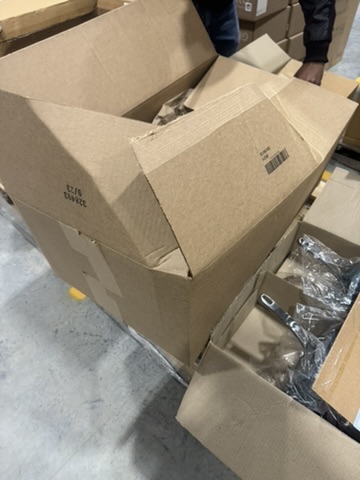
A customer orders two small items and opens a box big enough for six. There's kraft paper stuffed in the corners, and the order still rattles when they lift it out.
The carrier billed for that air. Inside the building, nothing about the order looks wrong. WMS cartonization recommended a carton when the order released, the packer scanned a bigger one at the pack station, and the label printed. Many WMS platforms keep both cartons on the pack transaction. When we look into rising dimensional weight charges, that pair of fields is the first thing we pull.
A packer who grabs a different box than the one recommended is making the same kind of override call a supervisor makes on a directed task. Sometimes it's the right call. When the same SKU goes into a bigger box every day for a month, the cause is usually somewhere upstream of the person holding the tape gun.
Where WMS Cartonization Leaves a Record
Cartonization picks a carton for each order from the carton suite set up in the WMS. It compares each item's length, width, height, and weight from the item master against the inside dimensions and weight limit of each carton. Fill and padding rules adjust the result from there. In most setups this runs at order release, so the carton is chosen before anyone has touched the product.
At the pack station, the packer scans the carton they actually used. If it matches the recommendation, there's nothing else to record. If it doesn't, many platforms store both, and some will also take a reason code if the site has turned that on. Field names vary by system, so check what yours keeps before you plan the data pull. If it only keeps the carton that shipped, a week of hand sampling at a few stations is a reasonable substitute.
Carriers bill each package on the greater of its actual weight and its dimensional weight. Dimensional weight is the box's outside length times width times height, divided by the DIM divisor in your carrier agreement. The divisor is often negotiated, so pull yours from the agreement before you model anything. Say a two-pound order goes out in a carton that bills at six pounds. You pay for six, and the charge arrives weeks later as a line on the carrier invoice with nothing on it that traces back to a pack station.
Why Packers Override the Recommended Carton
Plenty of these overrides are correct. The item master holds three dimensions and a weight, with nothing about the inch of bubble wrap a glass jar needs on every side. The packer can also see that the last bundle of 10x8x6 cartons at station 4 came off the pallet crushed. Or the recommended size has run out at the station and the truck leaves at 4:00. Some customers and carrier services also require a minimum carton size. A packer who goes up a size for any of those reasons is doing the job.
We'd turn on a required reason code for every carton override, even if nobody reads the codes for the first month. Keep it to five or six choices a packer can pick in one scan. "Fragile" and "item doesn't fit" are the two codes that matter most later, because they separate a packaging need from a data problem. By the time someone does look, there's a month of history to work from instead of a blank report.
Start With Item Master Dims
When the overrides pile up on a short list of SKUs, fix the dims before you add a carton size or ask for a quote on box-on-demand equipment. New carton sizes get picked by the same cartonization logic from the same item master, and many box-on-demand systems size the box from those dims too. More box options won't help if the dims are wrong.
Wrong dims come from a few familiar places. A supplier spec sheet gives the bare product and leaves out the retail sleeve. Someone keyed the case dimensions into the each fields during item setup. A SKU went live years ago with placeholder dims of 1x1x1 and nobody went back to it. Or the product was repackaged and the item master never changed.
In the pack data, the mismatches cluster on a handful of SKUs, and each of those SKUs goes to the same larger carton almost every time. The packers have learned that the recommended box won't close on those items, so they skip it.
Checking is cheap. Put a tape measure on three or four units of each SKU at the top of the mismatch list and compare the numbers to the item master. A dimensioner is faster if the building has one. Operations shipping enough volume to own a cubing station can measure new items at receiving, which keeps bad dims from coming back. Start here even when you suspect another cause, because the carton suite and fill rule checks both run on the same dims.
Pack transaction · illustrative
A bigger box leaves a data trail.
The WMS selected one carton. The packer scanned the next size up.
Then Check the Carton Suite and the Pack Stations
When the mismatches spread across many SKUs but nearly all land on the same one or two cartons, look at the carton suite. It may be missing a size the order profile needs. A common version is a wide gap between two neighboring cartons, so every order that won't fit the smaller one ships in a much larger box. The size may also still exist in the WMS after purchasing stopped buying it, so the stations haven't had any in weeks. Adding a carton means a supplier minimum, rack space at every station, and a WMS change, so confirm the gap with order data first.
Station problems look different. The mismatch rate climbs at certain stations or on one shift, whatever the SKU. A station may be short on the recommended sizes, or second shift may have picked up a habit of grabbing the 12x12x12 for everything. A supervisor standing at that station for a few shifts usually settles it.
Fill Rules Are the Last Thing to Cut
Sometimes the recommended carton is already too big before anyone overrides it. It shows up most on multi-line orders and tends to trace back to fill percentage, padding, or carton preference settings. Compare the recommended carton's cube to the combined cube of the items on a sample of multi-line orders to see how much air the rules add.
These are the last settings we'd touch. Padding rules usually got there for a reason, often after a run of damage claims. Cut the void fill and the DIM charge drops, but a broken item costs a replacement, a second shipment, return freight, and sometimes the customer. If you do change them, test the new settings on real orders at one station and watch damage and returns for a few weeks before rolling them out.
What to Check Before You Order New Boxes
Carrier rates are going up again, which makes every pound of air more expensive. FedEx's rate-change notice puts the average increase on U.S. package list rates at 5.9%, effective January 4, 2027. Your agreement determines what you actually pay, but DIM weight from an oversized carton gets billed at the new rate along with everything else.
Before deciding whether any of this deserves a project, pull the carrier invoice detail. Most carriers show whether each package billed on actual or dimensional weight. If only a small share bills on DIM weight and the overrides are scattered with reasons attached, a quarterly look at the mismatch report is enough. The work pays back when DIM-billed packages make up a big part of the invoice and the overrides keep landing on the same SKUs, cartons, or stations. Correcting dims is also the cheapest fix here, which is one more reason to start with it.
The first job is small. Sort last month's carton mismatches by SKU, then measure a few units of each of the top ten against the item master. In most operations that afternoon settles whether the oversized cartons start in the item data or somewhere downstream of it.