There's a version of the migration spreadsheet that circulates in every warehouse operation about to switch WMS platforms. Two columns, consultant-supported on one side and internal on the other. The internal column almost always looks cheaper, because the spreadsheet only has rows for what finance knows to ask about. It doesn't have a row for the inventory reconciliation gap during cutover. It doesn't have a row for three weeks of UAT rework after someone discovers the item master has fields the legacy system tolerated and the new one won't. These costs often outrun the consulting line, sometimes by a factor of two. But they don't appear on any worksheet, because nobody built a line item for them.
The Math the Spreadsheet Leaves Out
The cost of running a WMS migration with internal staff isn't their salary. It's the work they stop doing while the migration consumes their time. A WMS migration demands 600 to 1,200 hours of dedicated effort across data cleanup, workflow mapping, integration testing, UAT design, and go-live support. That work has to come from somewhere. In most cases, it comes from the people who are keeping the floor running.
When your most experienced operations manager spends 20 hours a week on migration tasks for three months, the operation doesn't pause during those 20 hours. It often runs on the judgment of less experienced supervisors, without oversight. Decisions that would have taken five minutes now take 30. Exceptions that would have been caught early compound into end-of-shift problems. The salary cost shows up on one spreadsheet. But the cost of degraded operational decisions during the migration doesn't show up at all.
Then there's the timeline. An internal team learning the new WMS as they configure it moves slower than a team that has done it before. When go-live slips by six weeks, the operation absorbs six additional weeks of dual processes. The legacy system stays online. The new system isn't ready. And a team that was already stretched before the migration started is now running both.
Where In-House Migrations Actually Break
The team at Optichain Advisors noticed that migrations tend to run into problems at three specific failure points that repeat across implementations.
The first is data. Most warehouse item masters, location masters, and inventory records carry years of accumulated inconsistencies that the legacy system tolerated. Duplicate SKU records, stale location attributes, and UOM mismatches between the WMS and the ERP accumulated quietly because the legacy system worked around them without complaint. An internal team often treats data cleanup as a mechanical exercise, exporting from the old system, mapping fields, and importing into the new one.
What an internal team misses is that the old WMS tolerated inconsistencies the new one won't. Fields that were optional in the legacy system become required for directed putaway or wave allocation in the new one. An experienced migration consultant knows which fields those are for the target platform. An internal team discovers them during UAT, when fixing a data mapping means re-running an import that touches 50,000 SKU records.
The second is exception handling. WMS configurations define the happy path well enough. Receiving screen, scan label, confirm, done. What breaks migrations is what happens when the label won't scan, or the PO doesn't match the ASN, or the carrier shows up with half a shipment and no notice. An internal team tests the standard workflow. A consultant who has seen go-lives fail tests the recovery path and builds the configuration to handle it before volume hits.
The third is cutover timing. Most internal teams plan cutover as a weekend event. Shut down the old system Friday, bring up the new one Monday. What they don't plan for is the 48 to 72 hours where transactions keep occurring but the final sync between systems hasn't closed. Receipts keep coming in, shipments go out, inventory moves, and the final sync is still pending. A cutover plan that doesn't account for in-flight transactions creates an inventory variance on day one that the cycle count program spends weeks chasing down.
When a Consultant Pays for Themselves
A migration consultant's fee pays for itself under specific, repeatable conditions. These aren't hypotheticals.
A mid-market WMS migration typically takes four to seven months with a dedicated internal team. With an experienced consultant supporting the same scope, the timeline compresses to less than three months. Each month of compressed timeline is a month the operation isn't running both processes, paying overtime for weekend testing, or absorbing the productivity dip that comes from your best people working on a software project instead of the floor.
That productivity dip alone often exceeds the consulting fee. When a senior operations manager at a 150-associate facility shifts half their time to migration work for four months, the operational decisions they're not making compound into errors, rework, and missed throughput that the P&L absorbs.
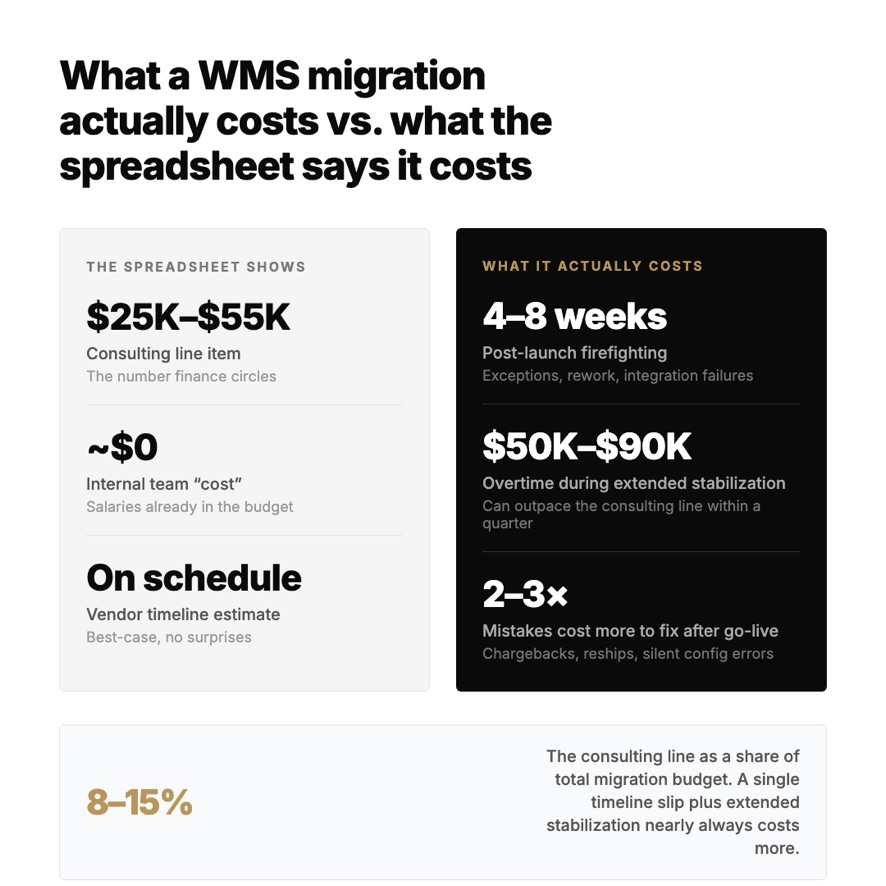
Post-go-live stabilization is where the cost gap widens further. Internal migrations average four to eight weeks of post-launch firefighting. Exception backlogs pile up, misconfigured workflows surface one after another, and integration failures that passed testing only appear once live volume hits. Consultant-supported migrations typically stabilize in two to four weeks. A consultant compresses that window because they've seen the failure modes before and built the configuration to avoid them.
Then there's the cost of mistakes that surface after the consultant would have left. A misconfigured allocation rule that ships wrong inventory for two weeks before anyone catches it. A carrier integration that fails silently and creates a backlog of unconfirmed shipments. A receiving workflow that accepts product without capturing the data fields compliance requires. Each of these costs real money in chargebacks, reships, and labor. Each is a problem most tenured WMS consultants have fixed before, and each costs more to fix after go-live than to prevent during configuration.
What Separates a Migration Consultant from a Vendor Resource
A migration consultant who has led real implementations brings a much different perspective from a vendor resource who has mainly run demos.
A vendor resource knows the software. They can show you every screen and every configuration flag. What they typically can't do is tell you which three workflows will cause 80% of your post-go-live pain, because they haven't spent enough time on warehouse floors to know which workflows break under real volume. They know the system's capabilities. They don't know your operation's failure modes.
A migration consultant who came up through operations asks different questions during the scoping phase. They ask to see 90 days of exception data. They walk the floor and watch how receiving actually works, not how the SOP says it works. They ask which three SKUs cause the most inventory problems and trace those back to the WMS configuration that's supposed to manage them. These questions don't come from knowing the software. They come from knowing what configuration mistakes look like when they hit a live operation.
Ask any consultant you're considering to tell you about a go-live that went wrong and what they did in the first four hours. A vendor resource will talk about system fixes. A migration consultant will talk about triage. Which workflows to shut down, which ones to keep running, how to communicate with the floor, what to tell the carrier who showed up during the outage. The answer tells you which one you want in the room at 7 AM on go-live Monday.
The Question the Spreadsheet Can't Answer
Most organizations ask whether they can afford a migration consultant. The better question is what the mistakes cost without one. What will those mistakes add up to in overtime, chargebacks, and missed throughput during the months that follow go-live?
For a mid-market operation running 100 to 300 associates, the consulting line in a migration budget typically represents 8 to 15% of the total project cost. A four-week timeline slip, two extra weeks of post-launch stabilization, and a handful of configuration errors that take months to surface will nearly always exceed that percentage, often by a factor of two or three.
The decision comes down to which part of the risk you want to carry yourself and which part you want someone else to have seen before. You can run the migration internally. Your team will get through it. The question the spreadsheet doesn't answer is what "through it" actually costs.